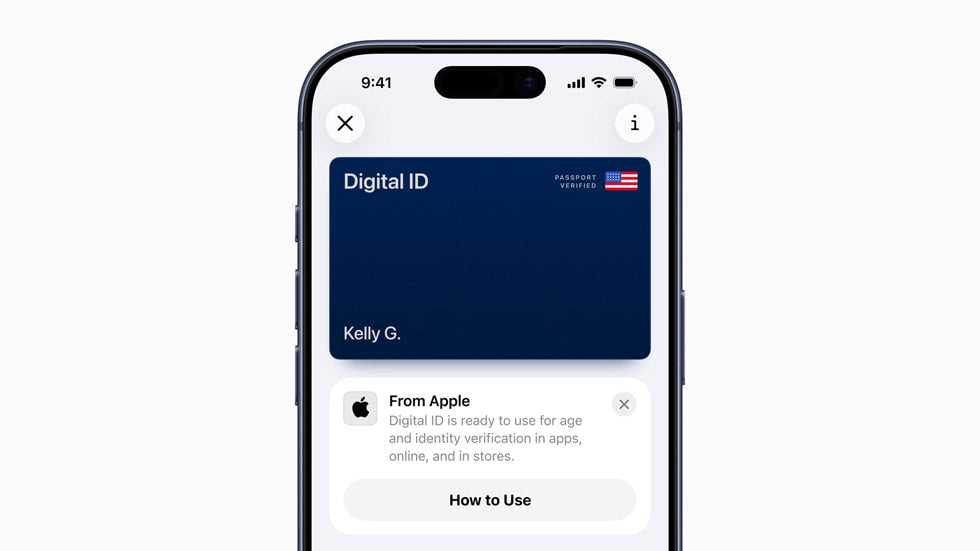
Apple just dropped a feature that might make your wallet lighter. Digital ID in Apple Wallet lets you store your identification right on your iPhone or Apple Watch. But before you toss your physical ID in the trash, let's break down what this actually means for you.
How Apple's digital ID actually works
Apple built two different ways to use digital identification in your Wallet app. Both work similarly, but they serve different purposes.
Passport-based digital ID
This is Apple's newest option. You create a Digital ID using your unexpired U.S. passport. Here's how you use it:
- Hold your device near the identity reader
- Review what information gets shared
- Authorize with Face ID, Touch ID, or double-click your Apple Watch side button
- At TSA checkpoints, they take your photo to compare with your Digital ID
Important reality check: This doesn't replace your physical passport. You still need the real thing for international travel and border crossings. Think of it as a TSA-friendly version of your passport info, not the actual passport.
Driver's license in Wallet
You add your state-issued driver's license or ID to Wallet. The presentation process works the same way as the passport version. You use this for age verification at businesses, some Apple stores, and select TSA checkpoints.
Security features that matter
Apple built some solid security into Digital ID that beats your physical cards:
- End-to-end encryption: Your ID data stays encrypted on your device
- Biometric locks: Face ID or Touch ID required every time
- Information control: You see exactly what data gets shared before you approve it
- Privacy protection: Apple and your state issuing authority don't track when or where you use your Digital ID
- Two-factor authentication: Required for your Apple Account
Compare this to your physical ID. When you hand over your driver's license, the person checking it sees everything: your address, license number, height, weight, and more. With Digital ID, you control what information gets shared.
What you need to get started
Apple set specific requirements for Digital ID:
- iPhone 11 or newer with iOS 26.1 or later
- OR Apple Watch Series 6 or newer with watchOS 26.1 or later
- Face ID or Touch ID turned on
- Bluetooth enabled
- Apple Account with two-factor authentication
- Device region set to United States
- Unexpired U.S. passport (for passport-based Digital ID)
If you're rocking an older iPhone or don't have the latest iOS update, you're out of luck for now.
Where you use digital ID right now
Here's where Digital ID actually works today:
TSA checkpoints
Select TSA checkpoints accept Digital ID for domestic flights within the United States. You still need your physical passport for international travel.
Businesses and venues
Some businesses, venues, and Apple stores accept driver's licenses in Wallet for age verification.
Online verification
"Verify with Wallet on the Web" works with websites like:
- Chime
- Turo
- Uber Eats
- U.S. Bank
- Arizona MVD
- Georgia DDS
- Maryland MVA
Which states support digital IDs
Right now, these states let you add your driver's license to Apple Wallet:
- Arizona
- Georgia
- Maryland
- Illinois
More states will likely join this list, but the rollout happens slowly. Each state needs to build the infrastructure and partner with Apple.
Comparing Apple's solution to existing options
Several companies tried digital IDs before Apple jumped in. Here's how Apple's version stacks up:
Better user experience
Apple's tight integration between iPhone and Apple Watch creates a smoother experience than standalone apps from other companies.
Stronger privacy controls
You see exactly what information gets shared before approving it. Most other digital ID solutions don't give you this level of control.
Wider acceptance potential
Apple's brand recognition and ecosystem might push more businesses to accept digital IDs. If you're shopping for iPhone accessories from iPulse, you already know how Apple's ecosystem works together.
Limited geographic reach
Other solutions work in different countries or states. Apple's Digital ID only works in the United States right now.
Privacy concerns you should know about
Apple talks up privacy, but some concerns remain:
TSA image capture
When you use Digital ID at TSA checkpoints, they capture your image for comparison. This creates a new data point that doesn't exist when you show a physical ID.
Device dependency
If your iPhone dies or breaks, your Digital ID disappears with it. You're stuck without backup identification.
Bluetooth requirement
Keeping Bluetooth enabled creates potential security vulnerabilities, even though Apple built protections into the system.
Tracking by verification entities
While Apple doesn't track your Digital ID usage, the TSA, businesses, and websites you present it to definitely track that information.
What this means for the future
Apple's entry into digital identification changes the game in several ways:
Faster adoption
Apple's involvement will likely push more states, businesses, and organizations to support digital IDs. The company's influence in tech adoption is huge.
Better standards
Apple's focus on privacy and security might force other digital ID providers to improve their offerings.
Ecosystem lock-in
Once you start using Digital ID, you become more tied to Apple devices. This benefits Apple but limits your future device choices.
International expansion
Apple will likely expand Digital ID to other countries, but this process takes years of negotiations with governments.
Current limitations hold back full adoption
Several factors prevent Digital ID from replacing physical identification completely:
- Geographic restrictions: U.S. only, limited states
- Device requirements: Newer iPhones and Apple Watches only
- Limited acceptance: Most businesses and organizations don't support it yet
- No international travel: You still need physical passports for crossing borders
- Battery dependency: Dead device means no access to your ID
Frequently asked questions
Does digital ID replace my physical passport?
No. Digital ID doesn't work for international travel or border crossings. You still need your physical U.S. passport for those purposes.
What happens if my phone dies at the airport?
You're stuck without identification. Always carry a physical backup when traveling.
Which information gets shared when I present my digital ID?
You see exactly what information gets shared before approving the transaction. This gives you more control than physical IDs.
Do other countries support Apple's digital ID?
No. Digital ID currently only works in the United States with U.S. passports and participating state driver's licenses.
How secure is digital ID compared to physical cards?
Digital ID offers better security through encryption, biometric authentication, and controlled information sharing. Physical cards have no built-in security features.
Which Apple devices support digital ID?
iPhone 11 or newer with iOS 26.1 or later, or Apple Watch Series 6 or newer with watchOS 26.1 or later.
What if someone steals my phone?
The thief would need your Face ID, Touch ID, or passcode to access your Digital ID. The encryption and biometric locks provide strong protection.
The bottom line
Apple's Digital ID feature represents a significant step toward digital identification, but we're not ready to ditch physical IDs completely. The current limitations around geography, device requirements, and acceptance mean you'll carry both digital and physical identification for the foreseeable future.
The real value comes from convenience and privacy control. Being able to verify your identity quickly at TSA checkpoints or online services while controlling what information gets shared beats fumbling for your wallet.
As more states join the program and businesses start accepting Digital ID, we'll see wider adoption. But international travel, older devices, and non-Apple users will keep physical identification relevant for years to come.
If you're already deep in Apple's ecosystem with the right devices, Digital ID offers genuine benefits. Just remember to keep that physical backup handy while the digital world catches up.
Share:
Apple's 3d-printed titanium watch cases change everything for accessories
Apple's 12th-generation iPad: Everything we know about the 2026 budget tablet